Should Your Agency Fix the PDF or Publish an HTML Version?
In short
- Remediating the PDF itself builds accessibility into the file, so the document stays accessible wherever it is emailed, downloaded, shared, or archived.
- A separate HTML version can serve website visitors, but the original PDF usually keeps circulating, and anyone who receives only that PDF meets the same barriers as before.
- Under the ADA Title II rule, conforming alternate versions are permitted only when technical or legal limitations prevent content from being made directly accessible.
- A remediated source file belongs to the agency outright, with no overlay, website script, or subscription needed to keep that document accessible over time.
- Agencies can start small by testing a handful of representative documents before committing to a plan for the full PDF backlog.
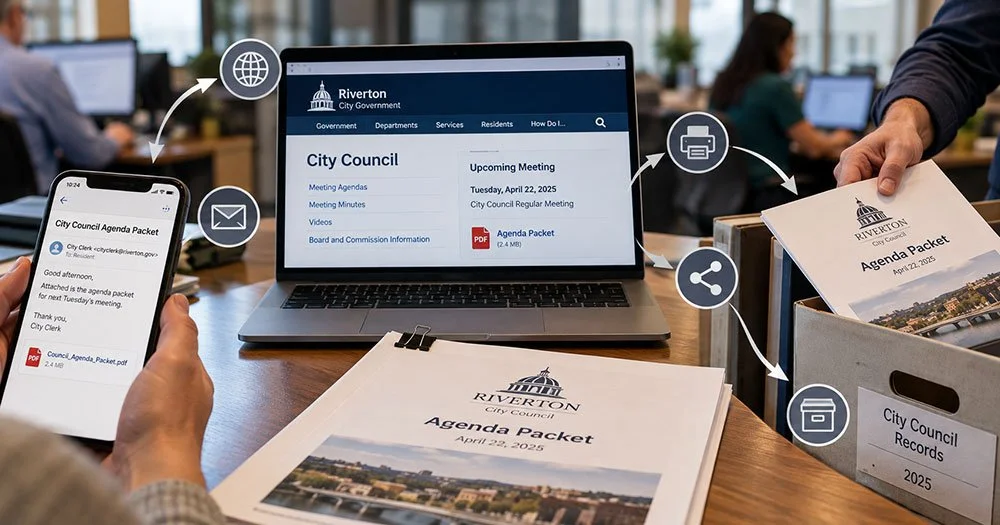
Think about the life of a single document, such as a council meeting agenda packet. It gets posted to the website. The city clerk emails it to a resident who asked for it. A copy goes out with a public records request. Someone saves it to a shared drive, and eventually it lands in the archive. That is one document and at least five copies, most of which never pass through the website again.
That path is the reason the choice between publishing an HTML version and fixing the PDF matters. Both approaches aim at the same goal. They cover very different ground.
Where public documents actually go
Most public sector PDFs do not stay on a web page. Budget documents, school board packets, permit applications, and annual reports are attached to emails, printed, forwarded between departments, and pulled from records systems long after they were first posted.
Each of those copies is the original file. If the accessibility work lives somewhere other than the file, those copies do not carry it.
What a separate HTML version covers
An HTML version is a web page that re-creates a PDF's content. For a resident who reads the document on the agency's website, that page may be the version they see.
Where the HTML approach stops
The PDF itself is unchanged. Someone who receives only the PDF by email, download, or from an archive may never see the HTML page, and the barriers in the file remain in place for that reader.
There is also an upkeep question. When a budget is amended or a form is revised, two versions need to stay in step. If the work depends on an ongoing service or website script, the accessibility of those pages can depend on that arrangement continuing.
What the Title II rule says about alternate versions
The Title II rule requires covered content to meet WCAG 2.1 Level AA, subject to specified exceptions. It also addresses separate versions directly: conforming alternate versions are permitted only when technical or legal limitations prevent the content from being made directly accessible.
Whether a particular HTML approach qualifies for a given agency is a question for that agency's counsel. What the rule makes clear is that a separate version is the exception, and making the content itself accessible is the expected path.
What changes when the PDF itself is remediated
Remediation works on the source file. It adds the underlying structure that assistive technology relies on, such as tags, a logical reading order, table headers, and descriptions of images, inside the PDF.
The result is a file the agency owns
Accessibility on Demand (AoD), the remediation service RDS offers, produces remediated PDFs that belong to the agency outright. No overlay, script, or subscription is needed for those files to stay accessible. If the agency emails, prints, or archives the document, the accessibility goes with it.
Fillable forms follow the same logic. At Level 2 and above, AoD produces a fillable, accessible PDF rather than an HTML re-creation of the form.
Why automation suits this work
Accessibility tagging is rules-based and repetitive, which makes it well suited to AI at scale. AoD applies 100% automation to the PDF remediation process, with over 95% of checks receiving a passing result against WCAG 2.1 Level AA and PDF/UA criteria when evaluated using third-party validation tools such as axes4 PAC. AoD reports that its platform reduces the cost of accessibility by 95% and processing time by 10X.
A checker score is a useful signal, not a certificate. Different checkers score the same document differently, and the goal is a document people can actually use.
Where to start
Most agencies do not know how many PDFs they hold or which ones matter most. Website PDFs are an obvious first look, since they are the most public. The larger inventory usually sits across departments, which is why IT is often the right owner for the broader plan.
A small test is the simplest first step. Running a few representative documents, such as a meeting agenda, a budget table, and a fillable form, shows what remediation involves and what the results look like.
Frequently asked questions
Does posting an HTML version of a PDF meet ADA Title II requirements?
Under the Title II rule, conforming alternate versions are permitted only when technical or legal limitations prevent content from being made directly accessible. Whether a specific HTML approach qualifies is a question for the agency's counsel. Remediating the PDF itself avoids the question, because the original document becomes accessible wherever it travels.
Do we have to keep paying to keep a remediated PDF accessible?
No, a remediated PDF stays accessible without ongoing payments. AoD produces source files the agency owns outright, with no overlay or subscription required to keep them accessible. The file can be posted, emailed, printed, or archived, and the accessibility built into it stays in place every time.
How much does PDF remediation cost compared with doing it by hand?
Manual remediation typically costs $8 to $25 per page for standard documents and $50 to $100 per page for fillable forms. AoD Level 2, which covers documents with tables, images, and fillable forms, costs $1.80 per page. Agencies can plan around a dollar budget rather than a document count.
Who is responsible for PDF accessibility in a public agency?
The public entity is responsible for the accessibility of its content, whether it provides that content directly or through contractual arrangements. A vendor can do the remediation work, but the obligation stays with the agency. Inside the organization, IT and communications staff usually share the work, with records custodians often holding key documents.
When do the ADA Title II web accessibility requirements take effect?
Under current deadlines, governments serving 50,000 or more people must comply by April 26, 2027, and smaller governments and special districts by April 26, 2028. These dates come from a DOJ interim final rule published April 20, 2026. Further rulemaking and ongoing litigation could change them.
Does a passing accessibility checker score mean a PDF is compliant?
No, a checker score is a signal, not proof of compliance. Different checkers score the same document very differently, and some flag false failures. A document can also pass a checker and still be hard to use, for example when every image description just says "image."
Request a free assessment of two to four of your documents to see what remediation looks like for your agency.